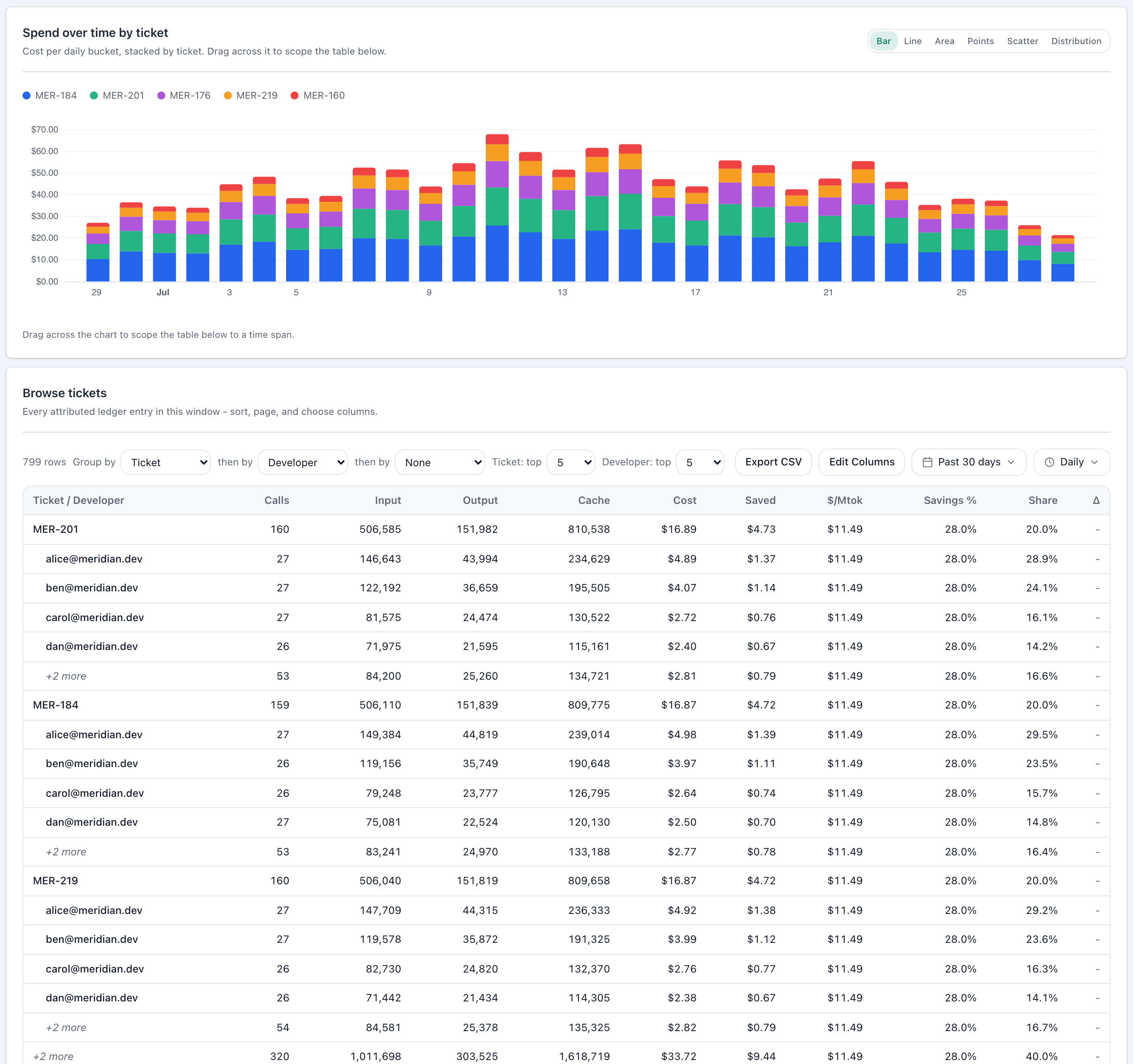
Finance asks what the AI budget went on, and engineering has no answer that survives scrutiny. Lineman prices every Claude Code session and writes the running total onto the ticket itself, so the breakdown by ticket, repository and developer is already there when the question comes - without anyone tagging, timing or filing anything.
A walkthrough on your own setup. Or start on the free tier, no card.
Works with your tracker
One number, once a month, for the whole company. Finance asks what the checkout rewrite cost. Engineering asks whether the agent earns its keep on small tickets. Neither question can be answered from a bill that has never heard of a ticket.
It knows keys, models and dates. It does not know your repositories, your people, or your backlog.
Dividing the bill by headcount tells you what people cost. It says nothing about what the work cost.
A line item at month end cannot change a decision that was taken three weeks earlier.
The same attribution answers the engineering question, the finance question and the board question. They are not the same question.
Spend lands on the ticket, the branch and the person, so a capacity conversation uses numbers instead of impressions, and an expensive refactor is visible in week one rather than at month end.
AI spend attributed to tickets, repositories, developers and cost centres, exported in a FOCUS-conformant dataset for whatever you already run. One line on a bill becomes a set of lines you can allocate and forecast.
Ask what the checkout rewrite cost, and get an answer with the work behind it. The same view surfaces spend that should not have happened at all.
Cost reporting, including the ticket breakdown, is on the free tier. Alerts and budgets are the Pro part.
The number on the ticket is one view of the data. In Cost Explorer the same spend regroups by ticket, developer, repository, branch, model or cost centre, over any date range you choose.

AI Spend USD (Lineman) is a genuine Jira number field, so it sorts, filters and reports through JQL like any other. On company-managed projects Lineman creates it for you; on team-managed ones somebody adds it to the work type once.
No timesheets, no tagging, nothing for a developer to remember.
The plugin records every Claude Code session with what it cost and the repository, branch and commit it ran on.
A branch called feat/LIN-3570-ticket-costs resolves to LIN-3570. The plugin, the branch convention and the dashboard share one derivation, so the branch name your team already writes is the entire configuration. Where branches carry no key, a mapping rule fills the gap.
Once an hour, every tracked ticket whose total has moved is updated in your tracker. Tickets whose number has not changed are left alone, so the issue history stays readable.
feat/LIN-3570-ticket-costsLIN-3570$412.87The branch you already named is the whole configuration.
What each tracker gets you, and what you can turn on today. Request access means built and staff-tested against the real service, not yet released to everyone.
| Tracker | What you get | Status |
|---|---|---|
| Jira | Every issue carries its own AI cost, in a real number field. Sort by it, filter on it and report it through JQL like any other Jira field. | Available |
| Jira Service Management | The same field on a service-desk request, so support work is costed alongside delivery work. You choose which desks are written to. | Request access |
| Linear | The cost sits in the issue sidebar as an attachment, updated in place rather than stacking up. | Available |
| GitLab issues | A note on the issue that is edited each hour rather than re-posted, so the discussion stays readable. | Available |
| GitHub Issues | A comment on the issue, edited in place. Totals are scoped per repository, because issue #123 is only unique inside one. | Request access |
| Azure Boards | A custom field on the work item, keyed on the AB#123 branch and commit convention your team already uses. | Request access |
| ClickUp | A comment on the task, edited in place. ClickUp has no API to create a custom field, so a comment is the only surface that works without per-list setup. | Request access |
Jira
Every issue carries its own AI cost, in a real number field. Sort by it, filter on it and report it through JQL like any other Jira field.
Jira Service Management
The same field on a service-desk request, so support work is costed alongside delivery work. You choose which desks are written to.
Linear
The cost sits in the issue sidebar as an attachment, updated in place rather than stacking up.
GitLab issues
A note on the issue that is edited each hour rather than re-posted, so the discussion stays readable.
GitHub Issues
A comment on the issue, edited in place. Totals are scoped per repository, because issue #123 is only unique inside one.
Azure Boards
A custom field on the work item, keyed on the AB#123 branch and commit convention your team already uses.
ClickUp
A comment on the task, edited in place. ClickUp has no API to create a custom field, so a comment is the only surface that works without per-list setup.
Repository, branch and developer attribution also works with GitHub, GitLab and Bitbucket, whether or not you use their issue tracker.
Four things worth knowing before you install it, rather than after.
Spend appears in Cost Explorer as it happens. The write-back to your tracker runs once an hour, so a ticket you are working on right now can be up to an hour behind.
If a branch carries no ticket key and no mapping rule matches, the spend is still counted and still attributed to the repository and the developer. It simply has no ticket to land on.
Jira's public API cannot add a field to a team-managed project on your behalf, so somebody with project admin adds AI Spend USD (Lineman) to the work type once. Company-managed projects are automatic.
A developer who has not installed the plugin contributes nothing to the total. The number is a floor on what a ticket cost, never an estimate above it.
If you have something we haven't covered, email us and we'll get back to you.
Not if your branches already carry the ticket key, which is the common case for Jira, Linear and Azure Boards teams. If they do not, the ticket-mapping wizard in Cost Explorer settings lets you define the pattern once for the workspace.
Bring a repository and a tracker to the call and we will walk it through on your own setup. Or install it yourself and see the first tickets costed within the hour.